






















Home > Archive > Recipes & articles > Copywriter’s guide


Sally Smith is a writer, editor, and the Communications Director for IDEA.


SpicyNodes opens up new methods of organizing information, particularly for web sites. As SpicyNodes is deployed in what is akin to 3D space, the linear rules of writing does not apply. However, if you are an experienced copywriter, you can construct your written content in SpicyNodes text fairly quickly and easily. This writer’s guide will help you efficiently transform existing web copy into an engaging SpicyNodes implementation.

SpicyNodes is ideal for many different kinds of web sites, including those for businesses, e-commerce enterprises, educational institutions, museums, non-profit organizations, and local governments. SpicyNodes is designed to enable you to communicate a large amount of information in a way that is completely accessible to readers. It allows web site visitors to chart their own path through your site, making the experience highly personalized, interactive, and engaging.
As a writer, you do not need technical knowledge to make your clients’ sites innovative and extremely useful. Indeed, writing nodemaps is a value-added service you can offer to your clients and developing this skill can pave the way to add to your client base by becoming a SpicyNodes Certified Partner.

A nodemap is an arrangement of nested information, similar to an outline. Second-level nodes spread from the first-level node; third-level nodes expand from each second-level node, and so on.
Each node consists of a header (label) and supporting text. Optimally, the header length should be from one to six words; the text can range from a short phrase to several sentences. Therefore, instead of thinking in terms of a flowing narrative, consider working in summarizations. Node copy is less like a magazine article, for example, or traditional web copy; but is instead more like catalogue copy or a series of link descriptors.

When organizing the information in a nodemap, it is particularly important to view the process from a reader’s perspective rather than an expert’s vantage point.
Generally speaking, a parent node should have fewer than five children to avoid clutter, although you can create an effective nodemap with as few as two children and as many as twelve.
Arrange your nodes logically so that readers can easily find what they need. This can often lead to an asymmetrical pattern of arrangement, with detailed information in the first set of nodes, rather than nested further down in the nodemap. However, this is perfectly acceptable.
For example, if you were converting a web site on the history and current practices of Daylight Saving Time into a nodemap, a hierarchical approach would place the beginning and ending dates of DST in the United States deep into the nodemap, such as DST > World > North America > United States. If you know that the vast majority of your visitors come to your site looking for this information, you can simply place it in the first level of nodes, such as DST > U.S. Dates.
When converting existing web site content into a nodemap, it is helpful to know which information is most sought after by visitors and then to place that information as a child or grandchild of the parent node.
Quick Tip: Converting existing web content into a nodemap may require you to reorganize information. If this is the case, it is useful to transfer sections of your site into a word processor, like Word, then arrange the information appropriately by simply copy and pasting. One way is to create an outline of overarching themes within a separate Word document, then copy and paste existing content into the outline. Once you have the copy plugged into the appropriate themes, it is simply a case of breaking it down into separate nodes.

When creating headers and text for nodes, some writing conventions hold true while others are thrown away. The most notable departure from convention is in the way in which content is organized. The journey readers take through a SpicyNodes implementation is exploratory rather than linear, so rather than organizing information in a typically hierarchical fashion, you should organize information in terms of facets. SpicyNodes lets readers investigate their interests without having to sift through irrelevant copy. This differs from typical linear text, whereby copywriters often must appeal to multiple audiences but are restricted by linearity.
Hierarchical organization has its place when direct structure of information is required; however, faceted organization offers different angles of approach on the same information to suit the purpose. Here is a simple example to illustrate the difference between the two methods of organizing information:
Joe Smith is the CEO of the XYZ company, he is married to Jane and he has two daughters, Mary and Kim. He coaches Mary’s soccer team and is an avid amateur photographer. The family owns a vacation home in Vail, Colorado, where they enjoy skiing and snowboarding.
If you were writing a profile of Joe Smith, you would be inclined to organize the information about him so that it dovetailed with the purpose of the publication. If it were a business story, you would focus heavily on the role he plays in the XYZ company, his qualifications to run the XYZ company, and the projected growth of the XYZ company. The details about his family and his hobbies would add color to the story. You might sidebar facts about the history of the XYZ company.
If you were writing a story about Joe Smith for a photography publication, you would use the fact that he is the CEO of the renowned XYZ company as a hook, but would focus on the cameras he uses, his winter photos of Vail, and so on. Likewise, if you were writing for a parenting magazine, you would focus on how Joe is a family man in light of his professional responsibilities.
SpicyNodes broadens the scope of a piece, allowing the reader to look at the facets of Joe Smith’s life that he or she finds relevant or inspiring.
A nodemap of Joe Smith would read very differently than a typical profile because it would be organized using facets of his life instead of using a hierarchy. In a nodemap, you could give equal weight to each aspect of his life. So, if “Joe Smith” is the parent node, there could be several child nodes: XYZ company, marriage to Jane, children, soccer, photography, skiing, residence, vacation home, and so on; drawing on different potential points of interest on Joe Smith’s life.

Each node needs a header, or title, and should draw in your reader, whether through interesting text, prompts, or questions. A node’s text can provide information, give the reader a choice, or both. Depending upon the purpose of your nodemap, the expository text can be a phrase, a sentence, or several sentences. Remember that visitors will have the option of expanding a node or scrolling to read the text. The key to a successful nodemap is simplicity and ease of use.
When writing node copy, a common dilemma is what to do when there is too much text for a single node. One solution is to break up the information into further “child” nodes. Another solution is to utilize graphics (rather than text) to illustrate a point. It is also easy to link one nodemap to another, which is helpful when you have a large quantity of information about a topic that is tangential to the nodemap you are currently writing. Also keep in mind that topics which need deep narrative are best suited for web pages, so you can embed an external link in a node and retain the reader’s ability to access lengthy, linear text.

When it comes to the mechanics of putting your text into the SpicyNodes system, you can take one of two approaches. The first of two allows you to create nodes visually under the "Edit content" tab in the SpicyNodes author interface.
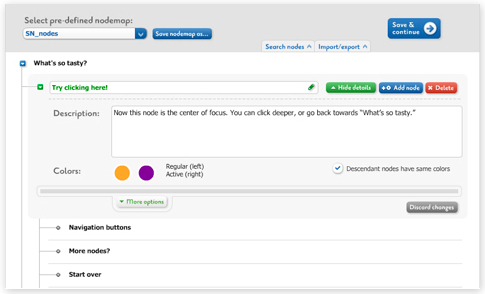
In this feature, you can simply use “Add node” or “Delete” buttons to create and delete nodes on the interface; while clicking on the title of the node will allow you to edit it. Just as intuitively, you can drag the nodes up or down to rearrange the sequence of your nodes, or to nest one node within another. This method is particularly useful for rearranging the hierarchy of nodes and conceptualize how your content is being structured. When you click on the “Edit details” button, you can add text or upload an image to go with the node.
The second method of entering your nodemap text content is to insert it as text itself. This can be done either by importing it into the SpicyNodes interface as a text file or directly writing into the interface (in the Code view section under the Edit content tab).
You can upload text files (.txt file extension). If you prefer to work from a text file, you can intermittently import your file to the interface in order to visualize your nodemap as you develop it. Using the import/export feature, you can alternate working online and offline as you edit the copy and refine the organization of your nodemap.
You can find out exactly how to do either method with SpicyNodes in our Author’s Guide.
Whether you create your nodemap text in a text file or write it directly into the Code view section of the interface, you need to use the SpicyNodes syntax to structure and format your text. The syntax behaves similar to devising an outline.
Whichever of the two methods you adopt to structure and write your nodemap content - either by creating the nodes visually using the interface or by text options - you can always export your node text by using the import/export feature. This is especially helpful when you are proofreading or making significant text changes.
For more insight into writing with SpicyNodes, you may wish to read A Writer’s Reflections, which is both an informative and practical piece. Alternatively, you can refer to the Author’s Guide for a detailed walkthrough on how to use the features of the SpicyNodes authoring interface to make nodemaps and build its content.


