






















Home > Archive > Recipes & articles > Author´s guide


Sally Smith is a writer, editor, and the Outreach Director for IDEA.


Creating a compelling nodemap isn’t difficult, but it does challenge writers to think and express themselves in new ways.

SpicyNodes opens up new methods of organizing information. In order to create a powerful nodemap, consider that you are working in what is essentially three-dimensional space. In other words, readers do not have to proceed through a conventionally single, linear path of information flow. Instead, they are able to make their own choices and follow the paths of information that pique their interest.
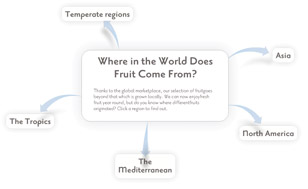

This guide offers a definitive walkthrough of how to develop a nodemap, from fundamental concepts of appropriately preparing your information content for a SpicyNodes implementation, to demonstrating how you can use the SpicyNodes authoring interface to create and build your nodemap.

When presenting information in exploratory form, it’s best to break the information down into categories, sub-categories, and interconnections — like a Table of Contents, or branches of a tree. Even if you are trying to tell a story of sequential events, it is still possible to break the story down into units — similar to a conventional book, which has as chapters and sub-headings. Websites present a "3D space" to spread out your information, whereby users not only select from web pages that differentiate information from a central "homepage," but also go into the web site to explore embedded pages linked through other pages.

The craft of writing node copy is slightly different than that of writing magazine or news articles, web copy, press releases, or technical material. With traditional forms of writing, you have a high word count in which to explain a concept or expound upon a theory. When writing node copy, you want to keep it short and to the point – from a few words to several sentences. The art of writing node titles is akin to writing titles and subheads for other media, while writing node copy is similar to writing captions or sidebars.
This is the concept of a nodemap — breaking your information down into small, interconnecting units, called nodes. You can either implement a SpicyNodes nodemap to represent a structure of interconnected web pages, or as a single, interactive visualization experience.

There are many different types of nodemaps; they can lead readers to the specific information they seek, but can also invite readers to browse and discover new information. Serving as a directory, nodes can act like a table of contents or a collapsible menu by breaking a topic into increasingly smaller pieces and swiftly leading the reader to the information he or she is seeking. When serving information content, a nodemap becomes more like a museum exhibit, inviting the reader to delve more deeply into topics of interest. Nodemaps often serve both purposes, and contain nodes that are like a directory by forming links, and nodes that are like an exhibit by displaying abstract information.
In all cases, the center node acts as a “home base." From the center, the visitor clicks on nodes to travel into the nodemap, but always has the option to return to where he or she started.

A useful and engaging nodemap begins with a single ingredient: information. Whether you are creating morsels from the copy on an existing web site, using nodemaps as a vehicle for creative expression, or researching a topic and compiling information from a variety of sources, start by having your information close at hand. This makes it exponentially easier to organize your information into a structure appropriate to the purpose, and allows you to prepare your nodemap content and structure before creating a nodemap within the SpicyNodes interface.


As SpicyNodes enables you to convey information and its connectivity from different perspectives to serve different purposes, the initial step is to clearly understand the objective of developing a nodemap in a given scenario, whether that is to transform a network of web pages into an interactive SpicyNodes implementation, or map a complex business process to visually dispaly and share. The nodemap’s purpose drives your approach, which then determines a best-fit structure to your nodemap. The best way to begin this process is to think about what message you want to convey, how you would like your specific audience to absorb and respond to your message, and any technical constraints you may have.
For example, mapping a business process might require a highly specific structure, and offer little navigational freedom to the user; however, it may require nodes to contain links to relevant documents held online, incorporate a subtle style to give it a professional look, and most importantly break down the process information into nodes that meet the business communication needs. Mapping a web site as a nodemap, however, might have contrasting requirements, such as graphics that are vibrant and attractive, structure pages and connections that optimize choice and accessibility, and structure and content that reflect what users are most likely to seek.
In tandem with having clear objectives, you will also need to consider the point of view of your audience when they first see your nodemap.


With any type of writing, it’s important to know your audience. When organizing nodemaps, it’s doubly important to know why your readers visit your web site. To make it easy for visitors to quickly find information in a directory-like fashion, your nodes should have consistent, hierarchical relationships. You may wish, for example, to have the concept depicted in each node be distinct and make each node mutually exclusive.
To achieve the best exploratory journey for your visitors, create an organizational structure for your nodes that is faceted, rather than hierarchical. Instead of adhering to a top-down approach, a faceted organizational style gives equal weight to several different concepts. This structure allows you to organize your nodes to reflect the most likely visitor thought processes and most interesting pieces of information accordingly.

- Your reader comes first — When categorizing topics for your nodemap, always think about how your reader will look for the information. Put important information front and center. Because SpicyNodes’ architecture is so flexible, you can easily place highly sought-after information at or near the top level of your nodemap.
- Think in morsels — Writing an effective nodemap involves learning to think in “morsels.” Break down the information into bite-size nuggets by incorporating sub-headings, use embedded links to guide readers to lengthy documents, and use graphics and images instead of words.


One of the most appealing aspects of SpicyNodes is that there are no rules governing how many nodes you must have and what each node must contain. Generally speaking, a parent should have fewer than five children, although you can create an effective nodemap with as few as two children and as many as 12 children. If a parent has too many children, the space may become too crowded and confuse your reader.
One helpful way to construct your nodemap is by using an outline. The central “home” node won’t be a part of the outline (since there’s only one central node), but all of its descendants should fit nicely into an outline.
Producing an outline will allow you to categorize your information, classify importance and types of information, and then further break them down. Eventually, each unit of information will become a node, one that leads on to other nodes or is the smallest unit of information on that path of information flow.

When trying to organize your nodes of information, bear in mind that node structures do not have to be arranged symmetrically; the goal is to prominently display the information your readers most often seek. So, while some of your first-level “children” nodes may be general in nature and allow your reader to drill down for detail, if certain details are of primary interest to your readers, you should make those “children” nodes as well. For example, your content might center around “All About Weather Forecasting,” but a significant number of your visitors might want to know the three-day weather forecast in their area. If that is the case, “Your Current Weather Forecast” should be a first-generation node.
- Play around with categories — The major nodes in a nodemap will not necessarily correspond to the sections of the existing site. Over time, you will get a sense of how to match up pieces of information for a logical flow.
- Start with a master document — Copy and paste the existing narrative web copy into a word processor. As you place that information into your nodemap, delete it from your master document. This enables you to keep track of what you have covered and what is left to address.
- Split the nodemap into segments — Adapting existing material is non-linear. Information contained in the first paragraph may go in one section of the nodemap, while information in the second paragraph may go in a completely different section. A syntax nodemap can be more than 100 pages long, making it cumbersome to scroll up and down looking for the right placement. It helps to give each secondary node its own document, and then to copy and paste them all together once you have finished.
- Find the balance — Some node “families” (a parent node and its next-generation nodes) will be large and some will be small. Although you can have as many as a dozen “children” nodes, it is easier for the reader if you have five or six. Similarly, try to avoid having fewer than three children nodes. It is relatively easy to find another tidbit of information and create the third node that will give the nodemap a nice visual balance.
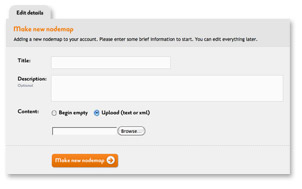

Creating a nodemap using the SpicyNodes interface is as simple as giving it a title (which cannot be changed later), writing a short description (which can be modified at any time), and clicking the "Make a new nodemap" button, as shown below. Whether you begin with a blank nodemap, or import a pre-prepared nodemap text file, the interface opens up and leads you to the next step of styling your nodemap.

The presentation of your nodemap involves many facets that need to be considered to optimize the user’s visual experience: layout and design of the nodemap; color schemes; text font and format; differentiating the look between parent and child nodes; interaction and navigation; and accessibility issues.
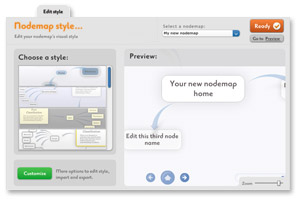
Once you have created your nodemap, the "Edit style" tab - as shown in the screenshot - holds a panel to edit the style, format, and presentation features. You can save combinations of style settings using the "Save style as..." option. Because styles are saved under your account and not for the specific nodemap you are currently working on, you can retrieve a saved style at a later time to use on another nodemap under the same account.
With a preview portion of the "Edit style" panel, you can immediately see the effect of a style setting, including the ability to test the interaction and preview the nodemap visualization in full screen. After any settings have been made, use the "Save" button. You can return to modify style settings at any time.

When you are ready to begin building your nodemap using the SpicyNodes interface (although you may choose to built it in a text file before creating a visual nodemap on SpicyNodes), the __"Edit content"_ tab provides you with a number of ways to structure your nodemap and add content, as illustrated below.
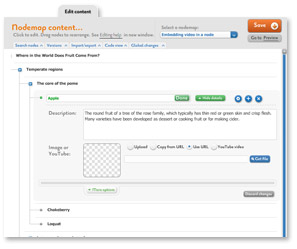

Using the default view of the Edit Content tab, you can build your nodemap from your central node, which is the parent of all other nodes that branch from it. Each node consists of a title and supporting, expository text. A node can also contain simple HTML, graphics, and a hyperlink. Optimally, the title length should be from one to six words. The text can range from a short phrase to several sentences, since visitors can read more information by expanding a node or by scrolling. A node’s text can provide information, give the reader a choice to carry out an action, or both.
The SpicyNodes interface provides an intuitive set of functional icons to edit a node as you hover your cursor over the node. You can add a child node with the plus-sign icon, delete the node you are hovering over (the system verifies this action, in order to avoid mistakes), change the position of the node in the nodemap structure with the arrows, and collapse the "Edit details" option for the node in order to expose the panel with which you can add your node content. A view of this collapsed panel, as well as all the different content options available, can be seen here:
The description is the key textual content of the node, but SpicyNodes enables you to use different mechanisms to enhance your nodal content with embedded images, embedded videos, links, and individualized colors. It is also key to note that the "Connector" and "Links" options enable you to connect to other nodes within the nodemap and completely separate nodemaps to accommodate complexity and networking of information. The "Links" option can also be used for hyperlinks. Naturally, any changes ought to be saved by the "Done" button, and the overall "Save" button.
The flexibility of options in the visual form of editing content enables frequent changes quickly and robustly. This is especially helpful for large nodemaps that may need structural modifications as they are developed.
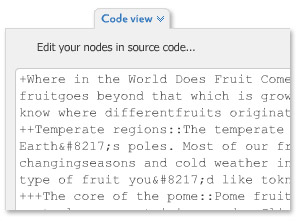

Switching to the "Code view" of the Edit Content allows you to see, develop, and edit a textual representation of your nodemap, as shown in the sample at right.
This example shows that nodes (as per the earlier visual representation of the example’s structure) are followed by a "+" sign, with each extra sign denoting a further embedded child node. This "+" sign is the most important of an easy-to-learn collection of SpicyNodes syntax, which you can use in combination to develop your nodemap entirely by text. You may do this in a word processor or text file before even venturing into the SpicyNodes interface, and import it as early as when creating a new nodemap on the interface, or later using the Import/export feature under the same Edit Content tab. Alternatively, you can develop a skeleton of your nodemap quickly using the visual representation of editing content, and then add or modify your nodemap content in the "Code view," or even export the nodemap code to a text file and work on filling it with textual representation of your content offline to import back into the interface later.
You can follow the SpicyNodes syntax guide for more detail on how to develop a nodemap via text, and the range of syntax available. Alternatively, if you are familiar with XML, you will see that by selecting the XML option on the "Code view," your nodemap will also be generated in XML format, which can be developed and edited in the same way as with the SpicyNodes code. For this more advanced form of nodemap coding, please refer to the Developers’ area.

For a working example of how to effectively develop a nodemap with SpicyNodes, you may find our tutorial on creating a nodemap on Fruit Cocktail a useful insight.
If you are predominantly a writer or copywriter, the Copywriter’s Guide gives a non-technical perspective on how to make the most of SpicyNodes to deliver effective content and copy.
- Use a style guide — Whether you’re writing brand new content or adapting existing content into your nodemap, it’s helpful to first create a style guide. A style guide is a master document that outlines the writing “rules” for your content. It may include punctuation and capitalization conventions, when to use abbreviations and acronyms, which verb tense to use, and much more. Having a style guide will ensure that your text is consistent across your nodemap.
- Interesting titles — Appetizers vs. the main course. When writing titles, keep in mind that you should draw in your reader, whether through interesting text, prompts, or questions.
- Look for parallels to narrative writing — Sometimes, it’s helpful to think of a main node as a thesis statement, and then write the subsidiary nodes to support that statement.
- Avoid the string of pearls — Some information, such as timelines or instructions, lends itself to sequential nodes. Resist the temptation! Instead, come up with a way to group the information. You could break down a timeline, for example, into century nodes, and then further into decade nodes, and then further into year nodes.

As seen in the visual form of editing content, you are able to embed images and videos, and provide hyperlinks in your nodes. You can upload multimedia either directly from your computer, or link to a multimedia URL. The option to embed a YouTube video does exactly that. This will enable the user to see the image or video directly in the node when selected. Uploaded images should be in JPEG format, but links to multimedia URL support different formats. Your node can exploit this by incorporating hyperlinks and multimedia with text to create dynamic nodal content; however, you should take care to avoid content clutter.
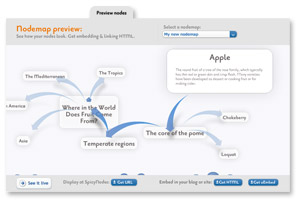

At any time, you can go to the "Preview nodes" mode, which allows you to see how your nodemaps will look. Click "See it live" to see a public version, click "Get URL" to copy to the clipboard a unique web address you can share with others, or click "Get HTML" ot "Get oEmbed" if you are going to embed your nodes in another site. When you get the HTML, you can enter a width and height, and highlight the code you will need.
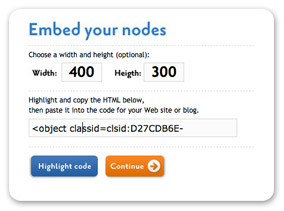

SpicyNodes is flexible, in that you can display your nodemap to a public online audience at any stage, even if you want to develop your nodemap further. Your nodemap is private until you specify otherwise, but it is available with its own SpicyNodes URL that you can link to as a standalone visualization when you want to make it public. However, you can also export your nodemap from SpicyNodes to embed onto an external website, and in doing so, you can display your nodemap elsewhere while developing back in SpicyNodes. This is done by capturing automatically generated HTML or an oEmbed URL representation of the nodemap in the state it is in at the time of capture. See also a more comprehensive guide on how to display your nodemap using SpicyNodes embedding features.


